Cut Audio Online: Trim & Export with Millisecond Precision
A ringtone from the chorus, the silence at the start of a recording, a sample from a long session: often all you need is one clean cut. The KodiniTools Audio Cutter does it in the browser, accurate to the millisecond. You see the waveform, set start and end, preview the selection and export the result. No installation, no registration, no upload.
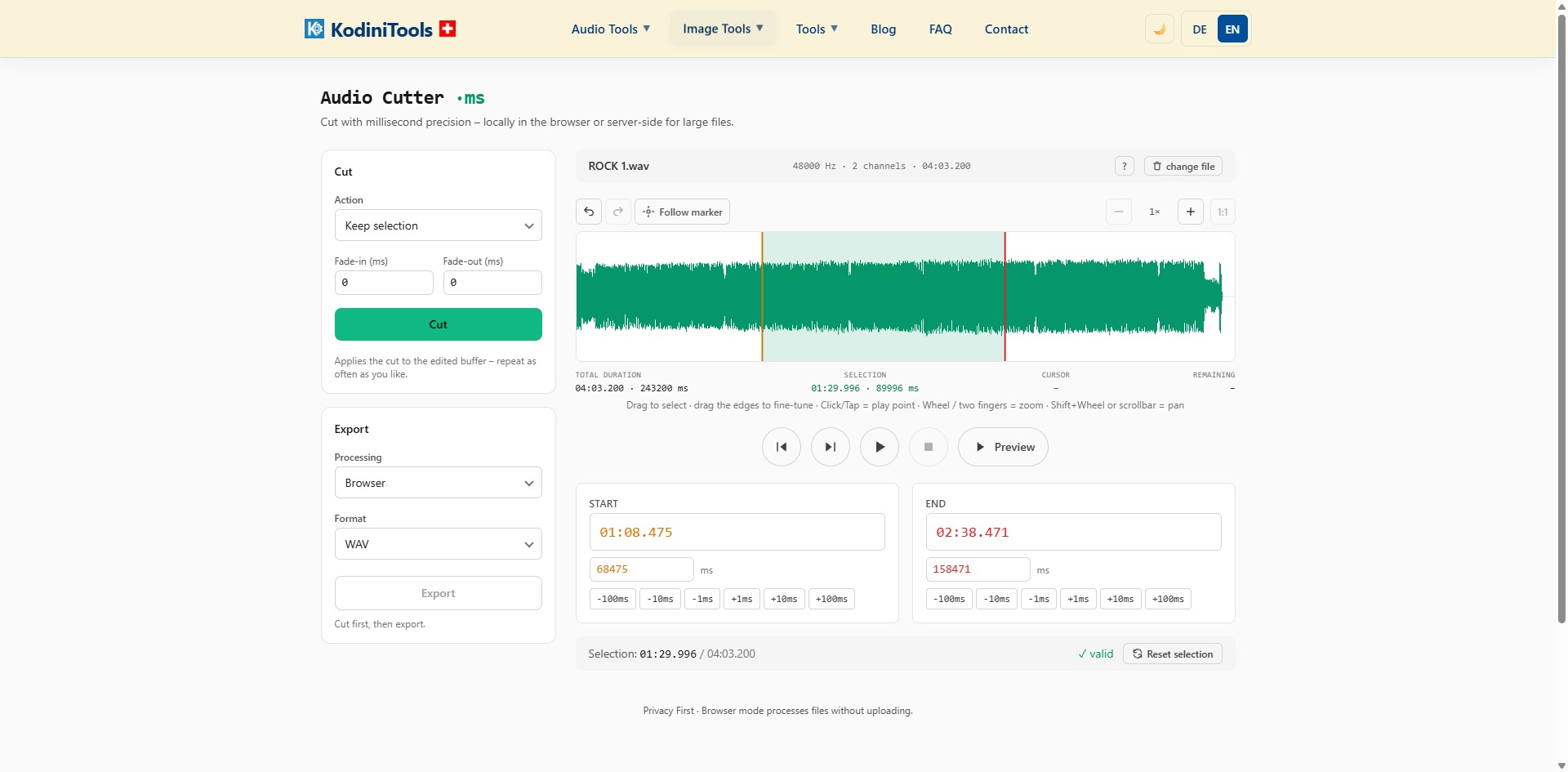
What Sets the Audio Cutter Apart
- Millisecond precision: start and end can be entered as time or directly in milliseconds. Buttons for ±1, ±10 and ±100 ms nudge the markers without mouse jitter.
- Waveform with zoom: drag to select, drag the edges to fine-tune, wheel to zoom, Shift+wheel to pan. The display shows total duration, selection, cursor position and remaining time.
- Preview: listen to the selection before cutting; with "Follow marker" the play position moves visibly along.
- Fade-in and fade-out: fade in and out in milliseconds so the cut does not click.
- Cut repeatedly: every cut applies to the edited buffer. Undo and redo protect every step.
- Browser or server: processing runs locally in the browser by default. For very large files you can switch to server-side processing.
Step by Step: Cutting an Audio File
-
Open the Audio Cutter
Go to kodinitools.com/audio-cutter — free, no registration.
-
Load a file
Select an audio file. File name, sample rate, channels and length appear at the top, the waveform below.
-
Set the selection
Drag across the waveform to mark the range you want. For precision, type the values under "Start" and "End" or nudge them with the ms buttons. The status line shows whether the selection is valid.
-
Preview and fades
"Preview" plays only the selection. If needed, enter fade-in and fade-out in milliseconds, about 20 ms against clicks or 500 ms for soft transitions.
-
Cut and export
Choose the action, click "Cut", add further cuts if needed. Then pick processing and format and press "Export". Cut first, then export.
Tip for exact cuts: zoom into the waveform with the mouse wheel until individual waves are visible and place the marker on a zero crossing. Together with a short fade of 5 to 10 ms the cut is guaranteed to be inaudible.
Typical Use Cases
- Ringtones: 20 to 30 seconds from your favorite song, with a fade-out at the end.
- Podcasts and interviews: remove lead-in, slips or pauses, several cuts in a row.
- Samples and loops: cut out single hits or bars with millisecond accuracy.
- Voice messages and recordings: pass on only the relevant part instead of the whole file.
Privacy First
In browser mode the file is processed entirely locally; there is no upload. Only if you deliberately switch to server-side processing is the file transferred for the cut. For voice recordings, interviews and unreleased music, browser mode is the right choice.
Cut audio now — millisecond precision, preview and fades, free in your browser.
Open Audio Cutter →