How to Create a Playlist: Generate M3U, PLS & XSPF Free in Your Browser
Writing a playlist by hand is tedious: typing file names, checking paths, getting the syntax right. The KodiniTools Audio Playlist Generator does it for you. Drop your audio files into the browser, set the order, and save the finished playlist in the format your player understands — no installation, no registration.
What Does a Playlist Generator Do?
A playlist file contains no music — only references to audio files in a defined order. Media players such as VLC, Winamp or Foobar2000 read this file and play the tracks one after another. The generator builds exactly this file automatically from the files you add: correct file names, clean syntax, and optional metadata such as title and duration.
Supported Playlist Formats at a Glance
| Format | Type | Best for |
|---|---|---|
| M3U | Text list | Standard for VLC, Winamp and almost every player |
| M3U8 | Text list (UTF-8) | File names with accents or special characters |
| PLS | INI structure | Winamp, streaming clients, older players |
| XSPF | XML | VLC, open standard with metadata |
| CUE | Cue sheet | Burning software, track markers |
| TXT / CSV | Text / table | Documentation, Excel, overviews |
| JSON | Structured data | Custom apps, web players, scripts |
Which format should you pick? When in doubt, M3U — it works practically everywhere. If your file names contain accents or special characters, M3U8 is the safer choice. For VLC with extra information, use XSPF.
Step by Step: Creating a Playlist
-
Open the Playlist Generator
Go to kodinitools.com/playlist_generator — free, no registration.
-
Add audio files
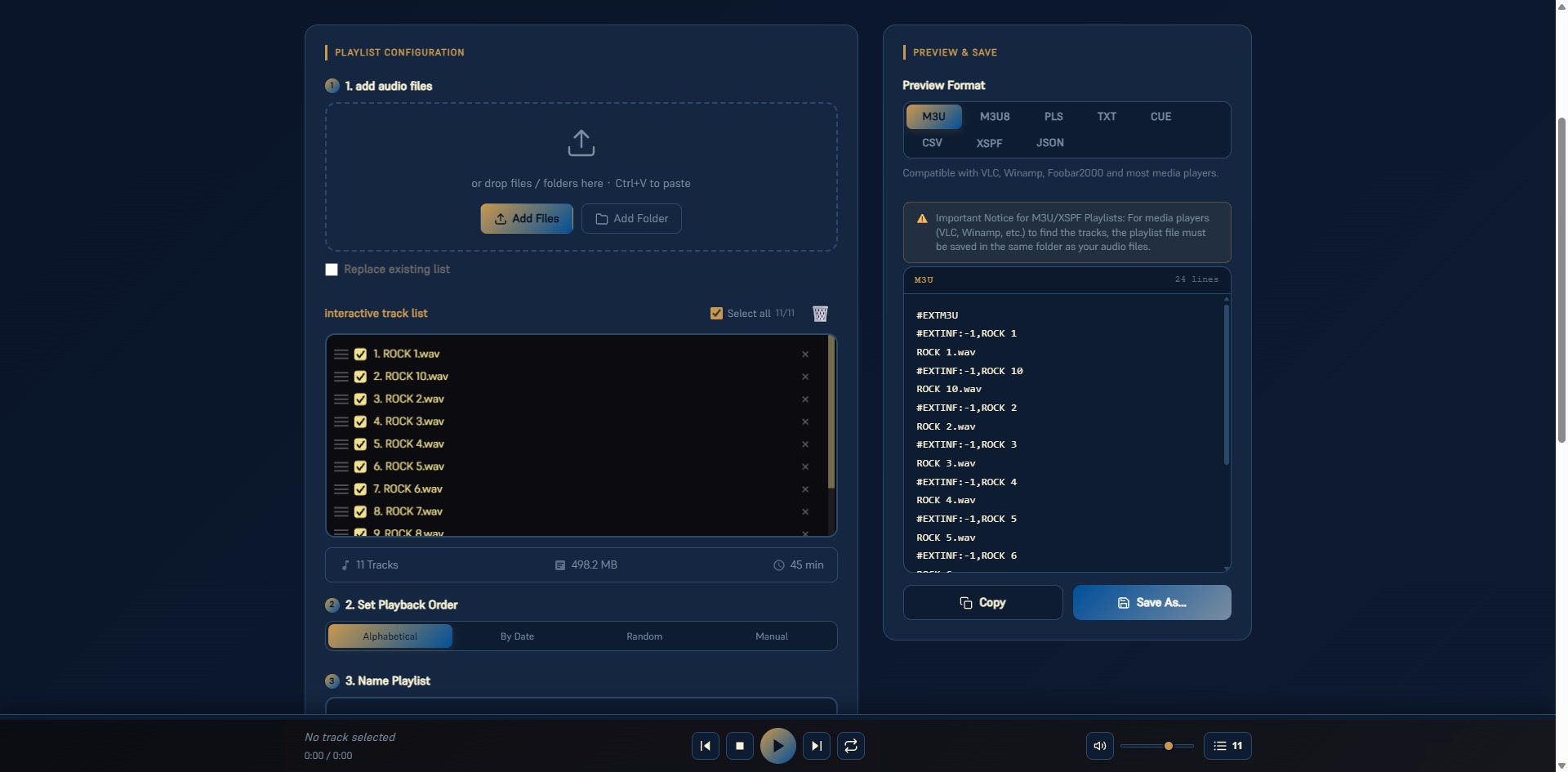
Select individual files or entire folders, drag and drop them, or paste with Ctrl+V. The interactive track list immediately shows the number of tracks, total size and total duration.
-
Set the playback order
Alphabetical, by date, random or manual — in manual mode simply drag the tracks to the position you want. Individual tracks can be unchecked or removed.
-
Name the playlist & choose a format
Enter a name and click the preview format on the right. The preview updates live — you see exactly what ends up in the file.
-
Save or copy
Use "Save As…" to download the playlist file. Alternatively, copy the content to the clipboard, for example for your own player.
Important for M3U and XSPF: Save the playlist file in the same folder as your audio files. Only then can VLC, Winamp and others find the tracks, because the list contains relative file names.
Listen Before You Save
The built-in player at the bottom plays the track list directly — with previous/next, stop, repeat and a volume slider. Check the order before exporting the playlist and reorder if needed.
Privacy: Everything Stays in Your Browser
The generator processes your files locally in the browser. Nothing is uploaded — neither the audio files nor the file names. This also makes the tool practical for large collections with several hundred tracks: no upload waiting time and no size limits imposed by a server.
Typical Use Cases
- Parties and events: add the music folder, shuffle randomly, load as M3U in VLC.
- DJ sets and radio shows: manual order via drag and drop, export as CUE or PLS.
- Audiobooks and podcasts: sort chapters alphabetically or by date so nothing gets mixed up.
- Archives and documentation: export the track overview as CSV for Excel or as JSON for your own applications.
Create your playlist now — free, no upload, in every common format.
Open Playlist Generator →