Extract Colors from an Image & Generate a Color Palette: Free in Your Browser
Which colors make up this photo? And how do I find matching tones for a website, logo or presentation? The Kodini Color Extractor answers both questions in one tool: part 1 reads the dominant colors of an image, part 2 creates harmonious color palettes from them or from scratch. Everything runs in the browser, with no registration and no upload.
Part 1: The Color Extractor
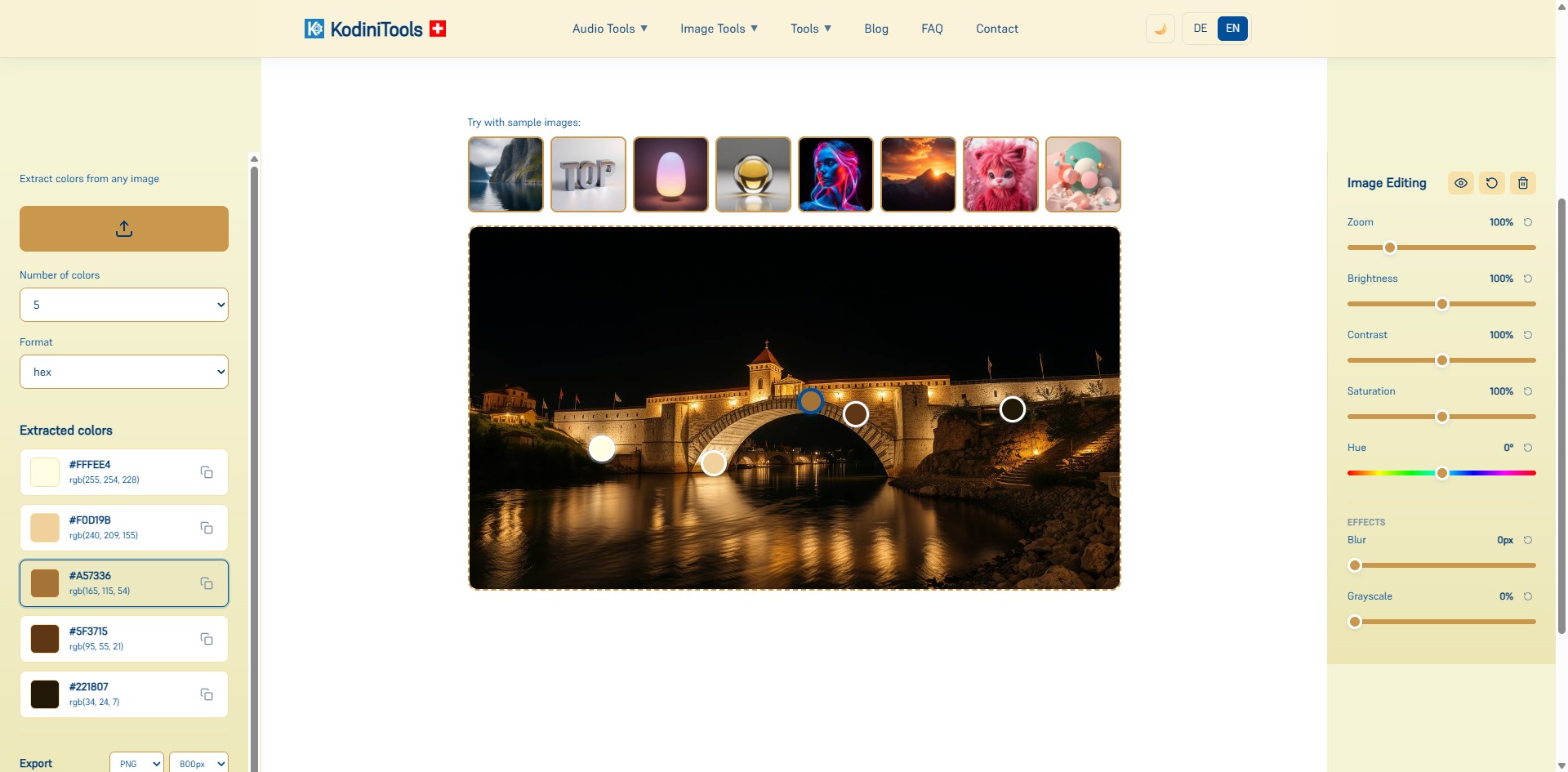
The extractor analyzes an image and identifies the colors that define it. Each color appears as a tile with its HEX and RGB value; one click on the copy icon puts the code on the clipboard. Markers on the image show where each color comes from.
What You Can Adjust
- Image source: upload your own photo or click one of the sample images to try the tool right away.
- Number of colors: how many colors are extracted, for example 5 for a compact palette.
- Format: output color values as HEX or RGB, depending on what your design tool expects.
- Image editing: zoom, brightness, contrast, saturation and hue can be changed with sliders. The extraction responds to them, so you can get a stronger or more muted palette from the same photo.
- Effects: blur smooths details and yields calmer blended colors, grayscale reduces the image to brightness values.
- Export: download the edited image as PNG in a selectable size — and the extracted palette in nine formats, from a plain HEX list to design tokens.
Step by Step: Reading Colors from an Image
-
Open the Color Extractor
Go to kodinitools.com/kodini-color-extractor — free, no registration.
-
Load an image
Select a photo via the upload button or click a sample image. The image appears in the center and the colors are calculated immediately.
-
Set number and format
More colors for detailed analysis, fewer for a clear brand palette. HEX for CSS and design tools, RGB for image editing.
-
Adjust the image (optional)
Experiment with saturation, contrast or hue until the palette fits. Every slider has its own reset icon.
-
Copy the color codes
Take over individual values via the copy icon, download the whole palette in one of the nine export formats, or export the image as PNG.
Part 2: The Color Palette Generator
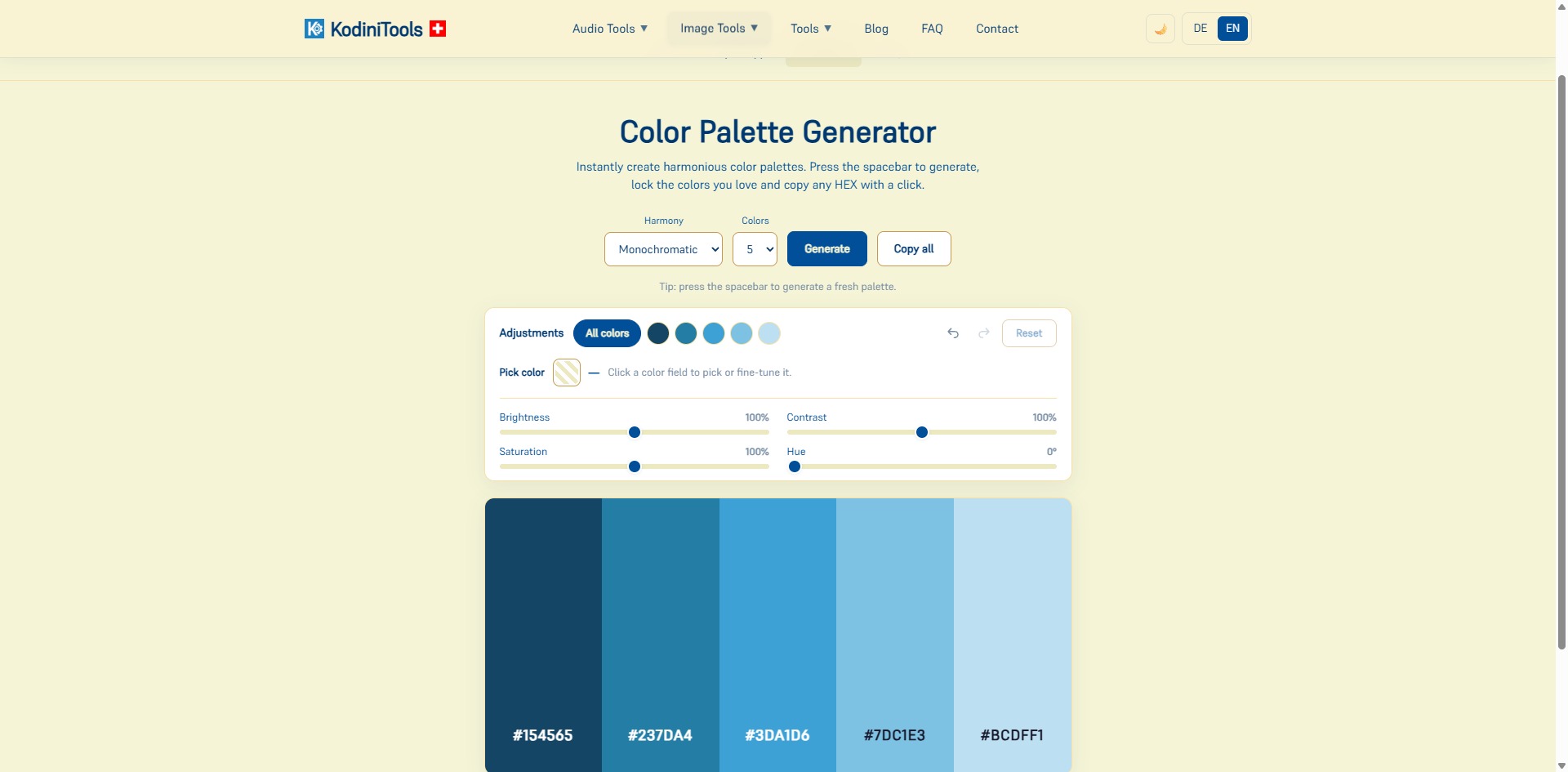
If you have no reference image or want to design a palette from scratch, use the generator at kodinitools.com/kodini-color-extractor/generator. At the push of a button it creates harmonious color combinations based on color theory, for example monochromatic shades of a base tone. The spacebar delivers a new variant each time until one fits.
Features at a Glance
- Harmony: choose the rule by which the colors relate to each other, such as monochromatic.
- Colors: set the number of fields in the palette.
- Generate with the spacebar: flip through many suggestions quickly without touching the mouse.
- Lock colors: if you like a tone, lock it and it survives the next generation.
- Adjustments: change brightness, contrast, saturation and hue for all colors together or for a single field. Undo, redo and reset are available.
- Pick color: click a field and fine-tune the tone directly in the color picker.
- Copy: individual HEX values with one click, or the whole palette via "Copy all".
- Export: the same nine formats as in the extractor — the generated palette goes straight into your project as CSS, SCSS, a Tailwind config or design tokens.
Combine both parts: extract colors from a reference photo, take the main tone into the generator and create matching shades for buttons, backgrounds and text there. That turns one image into a complete color scheme.
Nine Export Formats in Both Tools
Colors are only useful once they reach your project. That is why the extractor and the palette generator offer the same nine export formats. Pick the one your tooling understands and download the finished file — no retyping, no reformatting.
| Format | File | Best for |
|---|---|---|
| HEX | .txt | The classic — a list for design tools, documentation, emails |
| RGB | .txt | Image editing and programs that expect channel values |
| RGBA | .txt | Like RGB, plus an alpha channel for transparency |
| HSL | .txt | Hue, saturation, lightness — ideal for deriving shades |
| HSLA | .txt | Like HSL, plus an alpha channel |
| CSS custom properties | .css | Drop straight into any stylesheet as variables |
| SCSS variables | .scss | For Sass projects with variables and mixins |
| Tailwind v3 config | .js | Move the colors into your tailwind.config.js |
| W3C DTCG design tokens | .json | Standardized tokens for Figma, Style Dictionary and design systems |
The first five formats are plain text lists: one color per line, in exactly the notation you need. The other four are ready-made code files. The CSS file holds custom properties, the SCSS file named variables, the Tailwind file a color block for your configuration, and the JSON file design tokens following the standard of the W3C Design Tokens Community Group.
Which format for what? For a classic website, CSS is enough. Working with Sass? Take SCSS. If your team uses Tailwind, the ready-made config saves you every bit of manual work. And when the colors need to hold across design and code alike, design tokens are the right choice.
Typical Use Cases
- Web design: read color codes from a logo or mood board and use them as CSS variables.
- Presentations and social media: generate a palette that matches the cover image so graphics and photo work together.
- Brand management: check which colors actually dominate in existing materials.
- Interior design and crafts: determine tones from inspiration photos for wall paint or fabrics.
Privacy: Images Stay in Your Browser
Extraction, image editing and palette generation run entirely locally. No image is uploaded to a server. That makes the tool suitable for unpublished drafts and client material.
Extract colors and generate palettes now — free, no upload, directly in your browser.